

What Is Z-Fighting, Why Does it Occur and How to Fix It?
Overview
Z-fighting is a common real-time rendering issue caused by overlapping geometry in 3D models. In walkable virtual spaces, it leads to flickering surfaces and reduced visual quality. Architects and designers can prevent z-fighting by cleaning models, avoiding duplicate surfaces, adding small offsets, and optimizing geometry before uploading to Visiofy. Proper preparation ensures smooth, professional virtual walkthroughs that clearly communicate design intent.
What Causes Z-Fighting in 3D Models?
How Z-Fighting Affects Walkable Virtual Spaces
Common Z-Fighting Examples in Architectural Models
How to Prevent Z-Fighting Before Uploading to Visiofy
Z-Fighting vs. Other 3D Rendering Issues
Best Practices for Architects Using Walkable Virtual Spaces
Z-fighting is a visual artifact in 3D graphics where two or more surfaces occupy nearly the same position in 3D space, causing the renderer to rapidly switch between them. This results in flickering, shimmering, or noisy textures, especially noticeable when moving through a 3D scene.
In architectural models used for walkable virtual spaces, z-fighting can significantly reduce visual clarity and professionalism—especially when clients explore spaces interactively.
What Causes Z-Fighting in 3D Models?
Z-fighting happens when the graphics engine cannot reliably determine which surface should be drawn in front. The most common causes include:
-
Overlapping geometry (e.g. two walls, floors, or slabs placed on top of each other)
-
Duplicate surfaces created accidentally during modeling
-
Extremely thin surfaces without proper offsets
-
Imported CAD or BIM layers stacked without cleanup
-
Precision limits in real-time rendering engines
Because walkable virtual spaces rely on real-time rendering, these issues are more visible than in static images or floor plans.
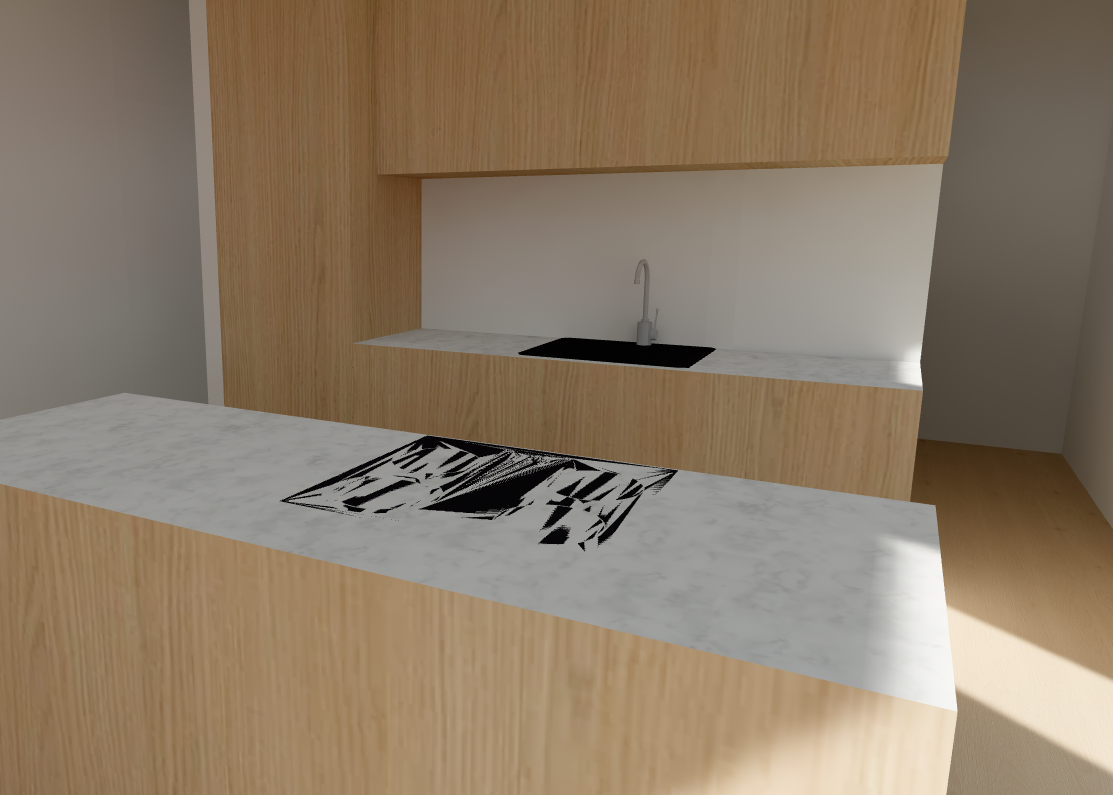
How Z-Fighting Affects Walkable Virtual Spaces
In a walkable virtual space, z-fighting can:
-
Cause floor textures to flicker while walking
-
Make walls or ceilings appear unstable or broken
-
Distract home buyers and stakeholders
-
Reduce trust in the accuracy of the design
-
Create the impression of low-quality visualization
For companies using Visiofy to present architectural designs, eliminating z-fighting is essential for delivering a smooth, realistic walkthrough experience.
Common Z-Fighting Examples in Architectural Models
Architects and designers most often encounter z-fighting in these scenarios:
-
Floor finishes placed directly on top of structural slabs
-
Interior walls duplicated between floors
-
Ceiling panels overlapping with structural ceilings
-
Imported furniture with duplicate faces
-
Exterior cladding layered over walls without offsets
These issues often come from modeling for construction, not for real-time exploration—an important distinction when preparing models for walkable virtual spaces.
How to Prevent Z-Fighting Before Uploading to Visiofy
To avoid z-fighting in Visiofy walkable virtual spaces, follow these best practices:
1. Remove Duplicate Geometry
Check for overlapping walls, floors, or surfaces and delete duplicates.
2. Add Small Offsets
Slightly offset finishes (e.g. flooring above slabs) so surfaces are not coplanar.
3. Avoid Zero-Thickness Surfaces
Ensure walls, floors, and ceilings have realistic thickness.
4. Clean Imported Models
When importing from CAD or BIM tools, remove unnecessary layers and construction-only geometry.
5. Optimize Before Export
Prepare a version of the model specifically for virtual walkthroughs, not construction documentation.
This preparation ensures your Visiofy experience remains clean, immersive, and client-ready.
Z-Fighting vs. Other 3D Rendering Issues
| Issue | Description | Common Cause |
|---|---|---|
| Z-Fighting | Flickering between surfaces | Overlapping geometry |
| Texture Stretching | Distorted materials | Incorrect UV mapping |
| Clipping | Objects disappearing | Camera near/far plane issues |
| Low Resolution | Blurry visuals | Large textures/poor optimization |
Z-fighting is unique because it is geometry-related, not texture- or lighting-based.
Best Practices for Architects Using Walkable Virtual Spaces
When designing models intended for walkable virtual spaces like Visiofy:
-
Model cleanly and intentionally
-
Think in terms of real-time exploration, not just drawings
-
Test navigation early
-
Simplify where possible
-
Prioritize visual clarity over construction detail
This approach improves performance, realism, and client understanding—especially for non-technical stakeholders.

Related reads:
How to Make Your SketchUp Models Look Perfect in Visiofy
Frequently asked questions
Why does z-fighting occur?
Z-fighting, also called stitching or planefighting, occurs in 3D rendering environments when two or more geometries share the same space, causing a flickering effect. The engine or GPU struggles to render one over the other since they have coplanar faces and can’t reliably decide which one is in front. As the camera moves, you see noisy pixels on those surfaces.
How to deal with z-fighting?
You'll get rid of z-fighting by simply moving the polygons further apart in your 3D design.
Is z-fighting a bug in Visiofy?
No. Z-fighting originates from the 3D model itself and is common in all real-time 3D engines.
Can z-fighting affect client presentations?
Yes. It can distract viewers and reduce confidence in the design during walkable virtual tours.
How can architects avoid z-fighting?
By removing duplicate geometry, adding small offsets between surfaces, and preparing models specifically for real-time walkthroughs.
Does z-fighting appear in static renders?
It can, but it is far more noticeable in interactive, walkable virtual spaces.
How to fix z-fighting in SketchUp?
To fix Z-fighting in SketchUp (flashing faces), ensure faces aren't perfectly coplanar, either by slightly moving them apart, giving one thickness, deleting the extra face, or adjusting grouping/layers, as it occurs when different surfaces fight for rendering priority in the same space.